
How it works
Health scan
Every other check runs on a translation TolkBot is writing. The health scan reads what is already in your locale files, whoever wrote it, and tells you what looks wrong. It costs no credits.
When it runs
- When you set up a language, on everything already in its files
- When a push to your default branch changes a locale file the project covers. This happens whether or not the project opens pull requests automatically, and includes the push that merges TolkBot's own pull request
- Every day, for a language whose last full scan is more than a week old
- When you ask, with the refresh button beside the search box on the Translations page
A scan looks only at values it hasn't judged before. TolkBot remembers its verdict on each pair of source text and translation, so a file that didn't change is free to scan again. A language with more than 1,500 values is scanned in several runs.
What it checks
| Finding | When |
|---|---|
| Wrong language | The value is in another language, such as Swedish in a Norwegian file, or has no character of the script the language is written in, such as Latin letters in a Korean file |
| Not translated | The value is the source text, word for word. Short strings and words that are the same in both languages, like "OK" or "Status", are left alone |
| Doesn’t match the source | The value adds, drops or changes something the source says |
| Placeholders differ from the source | The value's placeholders are not the source's, so your app may show a literal {name} or drop a value |
The script, untranslated and placeholder checks need no model. Language and meaning are asked of the same verifier that checks new translations. If the verifier can't answer, the value is checked again on the next scan rather than called healthy.
Where findings show up
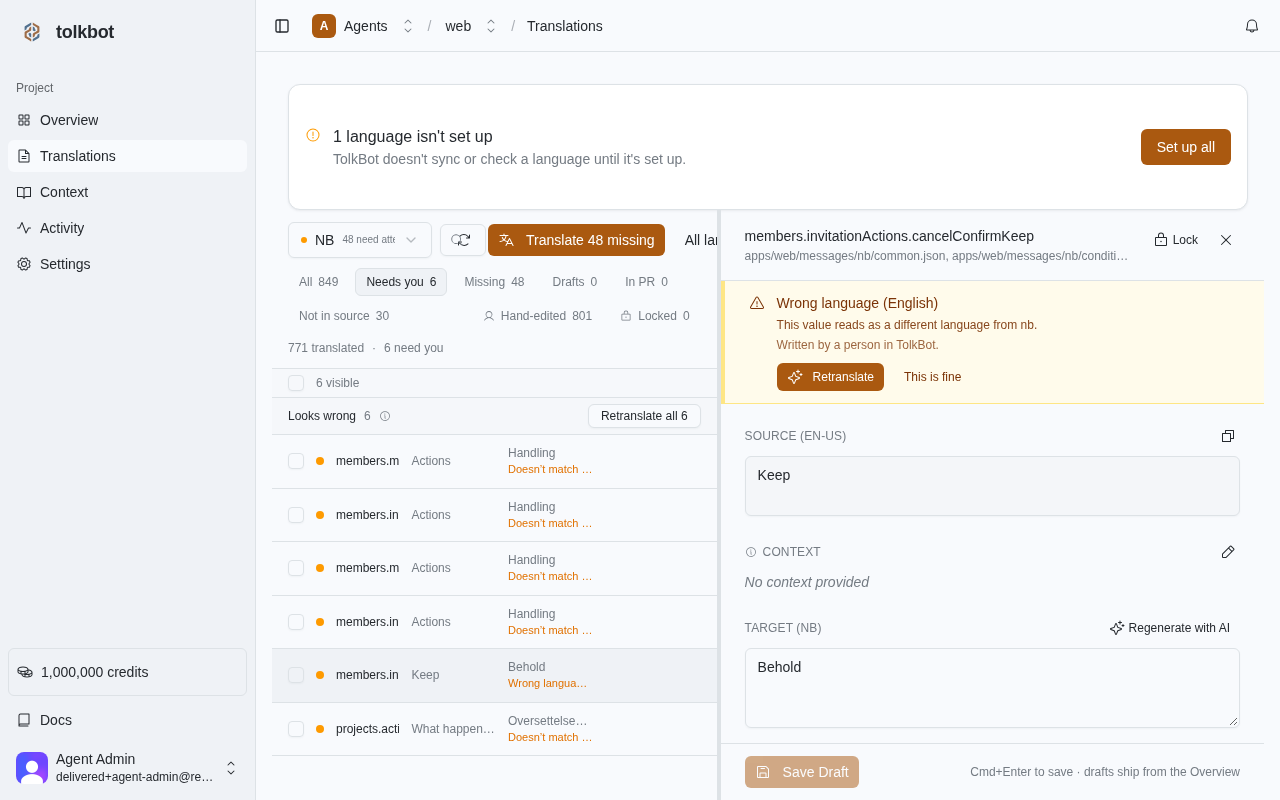
On the project's Overview page, findings are counted under Needs you as Looks wrong. Review opens them on the Translations page, where they are a group of their own with Retranslate all.
In the key inspector, a finding says what is wrong and who wrote the value:
- Written by TolkBot, with the date: a value TolkBot wrote and nobody changed since
- Written by a person in TolkBot: a value someone wrote in the dashboard
- Not written by TolkBot: the value was in the repository already, or was changed there
Two buttons go with it:
- Retranslate translates the key fresh from the source and saves the result as a draft for you to check and ship. A locked key can't be retranslated.
- This is fine tells TolkBot the value is right.
A wrong value that TolkBot wrote itself is also reported to the TolkBot team as a bug.
This is fine
This is fine dismisses the finding for that value. It is remembered for the exact source text and translation it was made on: as long as neither changes, TolkBot doesn't flag it again. When either one changes, the new pair is checked like any other.
When TolkBot changes what the scan checks, it may judge the same strings again. A value you marked as fine stays dismissed through that.