
Dashboard
Overview
The TolkBot dashboard is where you set up projects, see what is waiting on you, and look back at what TolkBot did. A project's Overview page is where it starts.
Finding your way
The bar at the top says where you are: Organization / Project / Page inside a project, Organization / Page outside one. The sidebar lists only what is in that place.
- Click the organization's name to go to its Projects. The arrow beside it switches to another organization or creates one.
- Click the project's name to go to its Overview. The arrow beside it finds a project, lists All projects or starts a New project.
The bottom of the sidebar shows your credit balance and, during a trial, how many days are left. It links to Billing. Your account menu below it has Account and Notifications.
Signing in opens your project if the organization has one, and Projects if it has several or none.
An organization's pages
- Projects, the projects in the organization
- Context, the organization's Glossary and Learnings. See Context
- Activity, translation jobs and pull requests across all projects
- Settings: Translation defaults, Connections, Members and Billing. See Organization and members and Billing and credits
A project's pages
A project is one set of locale files in one repository, usually one app or package. In a monorepo you can create several projects from the same repository, each with its own root directory.
- Overview, described below
- Translations, every key in every language, where you edit, lock and retranslate. See Translations
- Context, the glossary, learnings and suggested context the translator is given. See Context
- Activity, what happened, newest first. See Activity
- Settings: General, Languages, Translation and Workflow. See Project settings
The Overview page
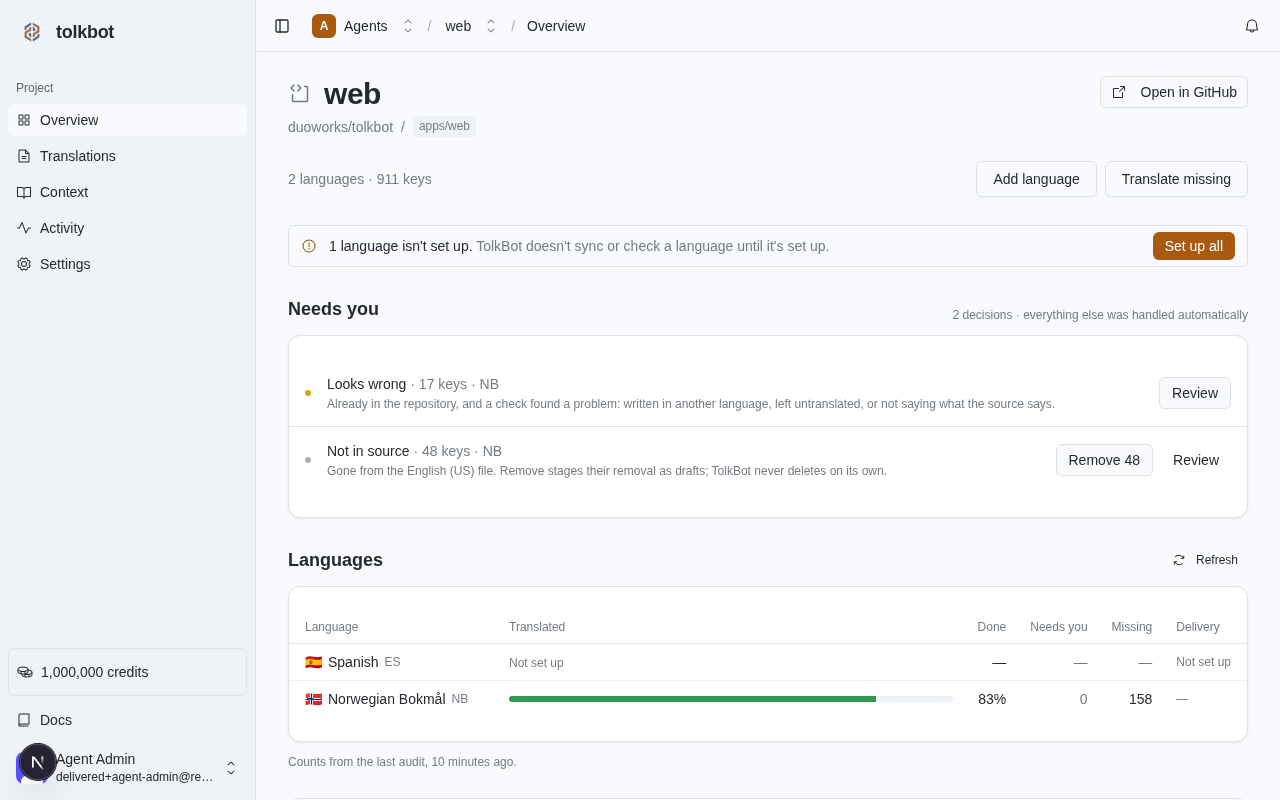
The line under the project's name says how many languages and keys it has. Add language opens the Add a language dialog, and Translate missing opens the Translations page. A project without a language says No languages yet, with Add a language, which opens the same dialog.
If the repository has locale files for languages you haven't set up, a one-line banner says how many aren't set up, with Set up all. See Adding a language.
Needs you
Needs you collects what TolkBot left for a person to decide, and says how many decisions there are. Everything else was handled without you. Each row says how many keys it covers and in which languages, and Review opens those keys on the Translations page.
| Row | What it means | What you can do from here |
|---|---|---|
| Changes not in the pull request | The last update of a pull request left some of your changes out, or failed. The row says why. The changes are still waiting | Retry, Review |
| Looks wrong | A translation already in the repository that the health scan found wrong: in another language, left untranslated, or not saying what the source says | Review |
| Source changed | The source text changed after the translation was written, and a person owns the translation, so TolkBot didn't replace it | Keep translations, Retranslate, Review |
| Reviewer suggests a change | The review pass proposed a fix it didn't apply on its own | Apply suggestions, Review |
| Needs wording | The review pass found a problem but had no fix to offer, such as a glossary term it couldn't place | Review |
| Suggested context | Notes TolkBot proposes for source strings that were too short or ambiguous to translate confidently | Accept all |
| Not in source | Translations whose key the base language file no longer has | Remove, Review |
Keep translations tells TolkBot the current translations still fit the new source text, so they are not retranslated for this change. Retranslate and Apply suggestions save new values as drafts, and Remove stages the removals; nothing reaches your repository until you open a pull request with them.
Changes ready
When drafts are waiting, a bar says how many changes are ready in how many languages, how many of them remove a key, and which branch they go into. It is the same bar as on the Translations page. Review and open pull request opens the review dialog; see Sending your changes.
Languages
One row per language:
- Translated, a bar of what is done and what needs you
- Done, as a percentage of the base file's keys
- Needs you and Missing, as counts
- Delivery: Not set up, Translating while TolkBot works on it, the open pull request, or the drafts waiting to ship
Languages at 100% are folded away behind Show more languages at 100%. The counts come from the last audit of each file, and the footer says when that was. Refresh audits every set-up language again.
Recent
The last five translation jobs. The Activity page has the rest.
Archived projects
An archived project keeps its Overview, Context and Activity pages, read-only, under a banner that says why it was archived. Its Translations and Settings pages are hidden. See Organization and members.