
Reference
Notifications and emails
TolkBot tells you about jobs, pull requests, your team, billing and your GitHub connection in the dashboard and by email. This page lists every one, who gets it, and which you can turn off.
In the dashboard
The bell at the top of the dashboard shows your notifications and how many are unread. Mark all as read clears the count. Notifications in your account menu, at the bottom of the sidebar, opens the full list and your preferences.
Notifications are per organization: you see the ones for the organization you are in.
Jobs, pull requests and your team
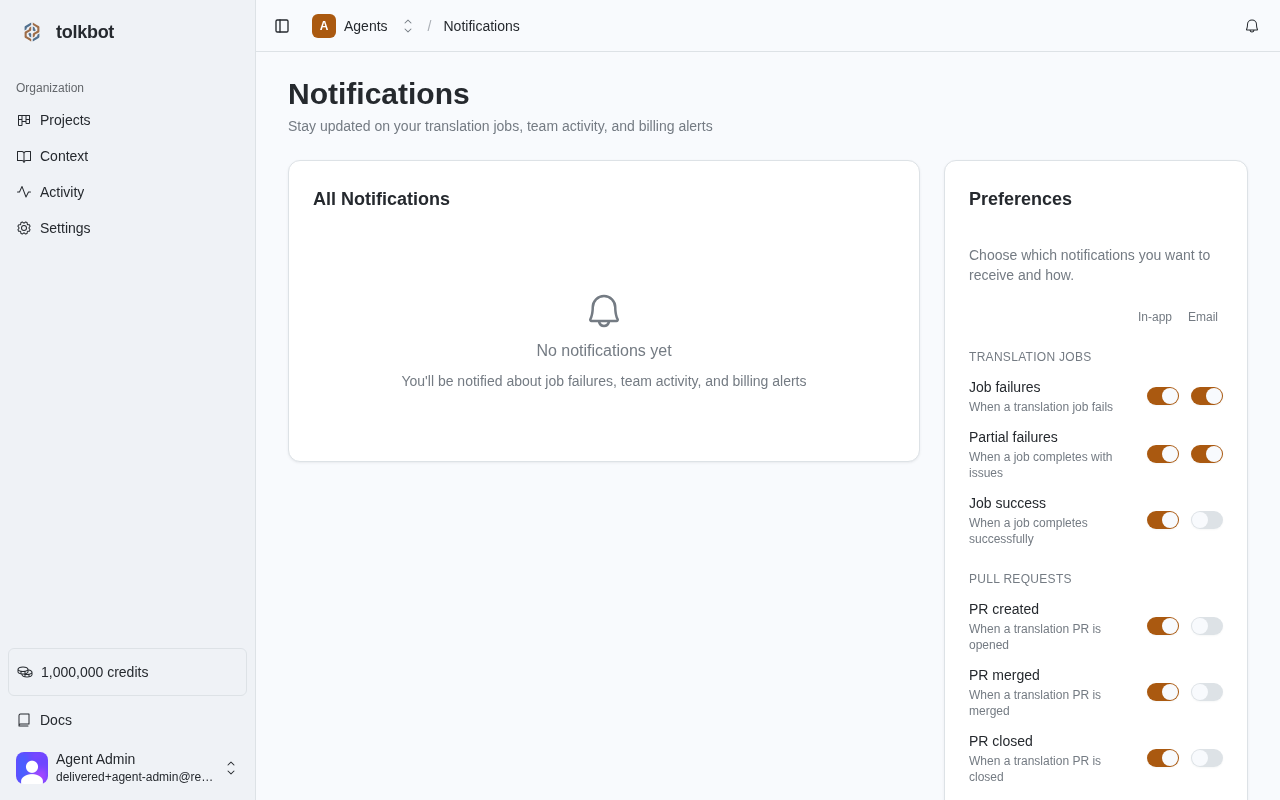
These go to every member of the organization. Each person chooses for themselves, on the Notifications page under Preferences, whether to get each one In-app, by Email, both or neither.
| Notification | Sent when | In-app | |
|---|---|---|---|
| Job failures | A translation job failed | On | On |
| Partial failures | A translation job finished with some keys failed | On | On |
| Job success | A translation job finished | On | Off |
| PR created | TolkBot opened a translation pull request | On | Off |
| PR merged | A translation pull request was merged | On | Off |
| PR closed | A translation pull request was closed unmerged | On | Off |
| Member joined | Someone joined the organization | On | Off |
The table shows the defaults. Each email has a Notification settings link to the same page.
Billing and GitHub access
These go to every member, both in the dashboard and by email, and can't be turned off: missing one can stop your translations.
| Notification | Sent when |
|---|---|
| Credits | The organization has used 80% of this month's included credits |
| Overage started | The included credits are used and overage is on, so translation continues |
| Out of credits | The included credits are used with overage off, or a trial's credits are used |
| Spending limit | This month's overage reached 80% of the spending limit |
| Spending limit reached | This month's overage reached the spending limit, and translation paused |
| Payment failed | A subscription payment didn't go through |
| Subscription canceled | The subscription was canceled |
| GitHub access paused | The TolkBot app was suspended on GitHub |
| GitHub access removed | The TolkBot app was uninstalled from GitHub |
| Repository deleted | A repository a project uses was deleted on GitHub, and its projects were archived |
| Repository transferred | A repository moved to an account TolkBot can't reach from this organization |
| Repository access removed | The TolkBot app lost access to a repository a project uses |
| Repository reconnected | A repository came back, and its archived projects with it |
Each credit alert is sent at most once a month, and only when TolkBot's own translations used the credits, not when the balance moves for another reason such as a renewal. The credit alerts show on the Preferences card as Credit alerts, always on. See Billing and credits and archived projects.
Product emails
These are emails only, to the organization's admins. Most of them invite a reply, which reaches a person.
| Sent when | |
|---|---|
| Your TolkBot trial ends in 3 days | The trial ends within three days |
| You're on (your plan) | The trial turned into a subscription |
| Your TolkBot trial has ended | The trial ended without a subscription |
| TolkBot is connected but hasn't translated anything yet | GitHub was connected three or more days ago and nothing has been translated yet |
| Your first TolkBot pull request is merged | The organization's first TolkBot pull request was merged |
Unsubscribe from product updates, at the bottom of each one, stops all of these for that email address, in every organization. It asks you to confirm first, and lets you subscribe again. Emails about your account, such as a failed payment or a failed job, keep coming.
Where emails come from
Product emails come from hello@tolkbot.ai, everything else from noreply@tolkbot.ai. The subject is the notification's title followed by the organization's name, for example Translation job failed in acme/web · Acme.